
Introduction
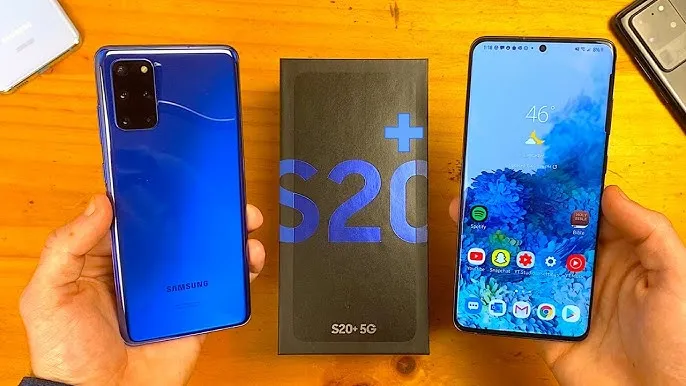
The Samsung Galaxy S20+ will still be a great smartphone, with a vibrant 6.7-inch Dynamic AMOLED display, capable tripartite cameras, and flagship-grade performance-especially when it’s a refurbished value pick in 2026.
Is the Galaxy S20+ still worth buying in 2026?
This long-term review provides an honest answer to that question. I’m going to focus primarily on battery life in the real world, how Exynos and Snapdragon models compare outside the store, camera performance now that the phone is five years old, software and security concerns, and a shopping checklist for a used/refurb S20+. I’m keeping it simple and straightforward because that’s what you really need when making a decision to buy a new phone, not when you’re being sold one.
Quick overview
Display: 6.7-inch Dynamic AMOLED 2X
Refresh rate: 60Hz / 120Hz
Processor: Exynos 990 (most international models) or Snapdragon 865 (US and some regions)
Battery: 4,500 mAh
Camera: 64MP triple camera system (main, ultra-wide, telephoto)
Launch year: 2020
Current status (2026): A used/refurb value phone instalment hardware at a discounted price, but with limited official software longevity.
Battery Performance in 2026
Why battery health matters more than the printed spec
A big battery with 4,500 mAh will be really good by 2020. Now it’s 2026 and battery condition is really important.You can have two Samsung S20+ phones that are exactly the same, and they can work very differently.The Samsung S20+ phone with a new or Properly Maintained battery will last for quite a long time as long as you are using it.The Samsung S20+ phone, with an old battery that has already been used a lot, can be really annoying and will not last long.Smartphones are consumables, meaning that lithium-ion batteries are designed to degrade after charge cycles. Even if the phone looks brand new, the battery has indecently been compromised.
120Hz vs 60Hz the measurable battery difference
The S20+ supports 120Hz, which gives smooth scrolling and animations. Smoothness costs energy.
- 60Hz: noticeably better battery life (less power used by display refresh).
120Hz: noticeably smoother UI, but measurable battery penalty.
Real-world differences (typical): On an S20+, a good battery, if it’s running 120Hz rather than 60Hz, will ordinarily lose battery life by 10% to 25% depending on screen brightness, apps, etc. The amount you’ll notice if you have a poorer battery will subjectively feel larger because you’ve got a lower-capacity battery to begin with.
How to check battery health
- Android settings: Go to Settings → Battery → Battery Usage some carriers/firmware show battery health probability; not always reliable.
- Use diagnostic apps: Apps like AccuBattery or Samsung Members (device care) can estimate capacity. Ask the seller to run a quick test and show results.
- Ask about replacement history: If the battery has been replaced recently (by a reputable service), that’s a major positive. If not, plan for a replacement cost.
- Observe charging behavior: Rapid,replicate drops in battery percent or sudden shutdowns at moderate percentages are red flags.
Battery saving tips
- Use 60Hz for daily use unless you really value 120Hz.
- Turn off Always-On Display.
- Limit background activity by incapacitating battery-hungry apps or setting them to sleep.
- Avoid gaming while charging (increases heat).
- Replacing the battery if health is below ~80% replacement is often the single best upgrade for a five-year phone.

Exynos vs Snapdragon: which S20+ should you try to buy?
Two silicon lines: what was released
Samsung shipped two main chipset variants for the S20+:
- Exynos 990 is the most international version (often model numbers like SM-G986B).
- Snapdragon 865 US models and certain region variants.
Both were flagship processors in 2020, but their behavior diverged in real use.
Practical differences explained simply
- Snapdragon 865 advantages:
- Slightly better power efficiency in many scenarios (so marginally better battery life).
- Better thermal controls strangle less under prolonged heavy load.
- Consistently stronger encourages performance, which helps in long gaming or heavy multitasking.
- Exynos 990 disadvantages
- Tends to run hotter under long loads.
- Slightly lower battery perseverance in many real-world comparisons.
- Performance can drop more under sustained stress due to thermal throttling.
Does it matter for everyday users?
For typical day-to-day tasks (social apps, streaming, browsing, photos), both chipsets are still capable in 2026. The difference shows up when you:
- Play exhausting games for long stretches.
- Use CPU/GPU-heavy editing apps.
- Rely on the absolute smoothest sustained performance.
If you’re a relaxed l user who values battery life and cooler running, snapdragon is better. If the price differences are significant, an Exynos can still be a solid buy, but factor in battery condition and ensure the price reflects the variant.
Camera performance in 2026
Strengths that remain useful
The S20+ camera hardware still holds up well for many common uses:
- Sharp daytime photos the main sensor produces detailed images in good light.
- Reliable HDR dynamic province is competent for most scenes.
- Useful telephoto/zoom The 64MP telephoto is handy for mid-range zoom (2x–3x) and works better than many budget phones.
- Night Mode still delivers usable low-light shots with steadiness or when using a tripod.
In short: for social photos, travel snaps, and everyday memories the S20+ is competent in 2026.
Best camera settings
- Daylight: Use Auto mode; keep HDR ON. Use 1x or 2x optical/combined zoom rather than high-ratio digital crop.
- Low light / night: Use Night Mode and keep the phone steady; tripod or leaning the phone on a steady surface revamp results dramatically.
- Video: For the best do 4K @ 30fps; use 1080p @ 60fps if you prefer smoother motion with lower storage cost.
- Pro mode: Use only if you know how to adjust ISO, shutter speed, and exposure compensation otherwise Auto is safer.
Common camera problems and fixes
- Blurry photos: Clean the lens, ensure autofocus locks, use Night Mode in low light, or use Pro mode to lock settings.
- Slow camera app: Clear camera app reserve or force stop, reboot the phone. Long-term slowness can be caused by limited free storage and clear space.
- Over-processed images: Switch to Pro mode or use third-party raw editors for more natural results.
What the S20+ won’t match in 2026
Flagship camera hardware has continued evolving since 2020. The S20+ cannot match:
- The latest computational photography tricks (multi-frame stacking sophistication) of 2024–2026 flagships.
- Large sensor superiority of recent phones optimized for low light and portrait separation.
- Ultra high optical zoom ranges (many newer phones offer better periscope telephotos).
If absolute best-in-class mobile photography is your priority, a newer model will outperform the S20+. But for most people who want clean daytime shots, usable low light, and practical zoom, the S20+ remains solid.
Software updates & security in 2026
Update lifecycle reality
The Galaxy S20+ is an older model. By 2026, official major Android recondition have mostly stopped for the 2020 flagships, and the security update cadence might be limited or stopped based on the region and carrier.
Why this matters
- Security patches protect you from vulnerabilities that could be exploited by apps or malware.
- App compatibility: Some newer apps or updated versions may require newer Android APIs and could ultimately stop supporting older OS levels.
- Banking and security apps sometimes refuse to run on devices without minimum security patches or hardware attestation.
What you can do when updates stop
- Use strong device security: PINs, biometric locks, and app locks for sensitive apps.
- Limit risky behavior: Avoid installing mistrustful apps or clicking unknown links.
- Consider custom ROMs: Advanced users can explore community ROMs (LineageOS, etc.) for continued security patching but this requires technical skill and can void warranties and complicate banking/DRM features.
- Plan for replacement: If you need guaranteed long-term support, a newer phone with a longer official update covenant is a safer choice.
Buying a used or refurbished Galaxy S20+
This section is a practical inspection and negotiation checklist you can use in person or remotely.
Physical checks
- Screen: Check for burn-in, dead pixels, even brightness, and touch responsiveness across the whole panel.
- Body: Inspect for dents, bends, decomposition round ports (sign of water damage).
- Cameras: Open camera app and test each lens to take photos in daylight and low light.
- Speakers & microphone: Play audio and record a short voice memo to test microphone quality.
- Biometrics: Test fingerprint and face unlock.
- Connectivity: Insert your SIM and test 4G/5G (if supported for that model), Wi-Fi, Bluetooth, and NFC.
- Charging & battery: Plug in and check charging behavior; observe battery percentage increase and overheating.
- Buttons & ports: Ensure power and volume buttons are snappy; test USB-C port for charging and data.
- Factory reset & account check: Ask the vendor to perform factory reset in front of you (or ask to sign out of accounts) to ensure Activation Lock is not present (Samsung account). For used purchases, buying a device still signed into the previous owner is a major red flag.
Price expectation & negotiation points
Pricing varies hugely by region and condition. Use the following as negotiation levers:
- Excellent condition + healthy battery + Snapdragon: ask for top of market price.
- Average condition + original battery ~75–85% health: mid-range.
- Poor battery (≤70%), screen replacement, visible damage: should be exorbitantly discounted; factor in repair costs.
- No IMEI or suspicious history: walk away or offer very low with risk accounted for.
Never overpay for a used phone with poor battery or unknown repair history.
Maintenance tips to extend life
Daily care
- Use a protective case and screen protector.
- Avoid full 0→100% cycles and regularly aim for top-ups.
- Keep storage under ~80% to avoid strangulate and slowdowns.
- Don’t leave the phone exposed to high heat (cars, direct sunlight).
Battery longevity routines
- Charge between 20%–80% for most of the time.
- Avoid cheap, uncertified chargers; use reputable chargers and cables.
- If you plan to store the phone, keep it at ~50% charge.
- Replace the battery dedicated when capacity drops below ~80% to restore usable life.
Resale value tips
- Keep the original box and accessories if possible.
- Maintain the physical appearance: replace a heavily scratched screen or cracked back only if the repair cost will be Recuperate in resale.
- Keep repair records and service receipts buyers trust documented maintenance.
- Before sale, factory reset and wipe all accounts, and clean the device.
Price expectations (2026) general guidance
Prices are region dependent and fluctuate with supply. As a rule of thumb:
- Excellent surroundings (recent battery replacement, Snapdragon, minimal wear): higher end of used market.
- Average (original battery ~75–85%, normal wear): common mid-range used price point.
- Poor (worn battery, screen or water damage): low price only.
When comparing offers, always factor in the cost of an out-of-warranty battery replacement, which in many markets is cheaper than obtaining a new mid-range phone but not free.
FAQs
Yes, if you buy it refurbished. It still offers a smooth 120Hz AMOLED display, good cameras, and premium build quality, but software updates are limited.
The Snapdragon version delivers better battery life, cooler performance, and more stable gaming. Exynos models are fine for daily use but less efficient.
With light to moderate use, expect around one day of battery life. Heavy users may need a top-up, especially on Exynos variants.
Major Android updates have ended, but security patches may still arrive depending on region. It’s safe for normal use, but not future-proof.
Yes, The triple camera setup delivers sharp daylight photos, solid video, and usable zoom, though low-light can’t match newer flagships.
Final Verdict
The Samsung Galaxy S20+ remains an acquisition worth considering if you are looking for a premium display, Silky Performance at 120Hz, and capable cameras for a lower price tag than its contemporaries. Though it may not offer the latest software updates, it excels as a refurbished steamer for its value in 2026.
